
HTTP 200 verified twice
Workflow tools · Tool
Tango
ResearchedTango is a workflow documentation and digital adoption platform that captures processes via browser and desktop capture, turning them into step-by-step guides, in-app guidance, automations, and SOPs. It serves HR, finance, insurance, healthcare, and financial services teams.
Official site snapshots
Visit live site See the official site at a glance
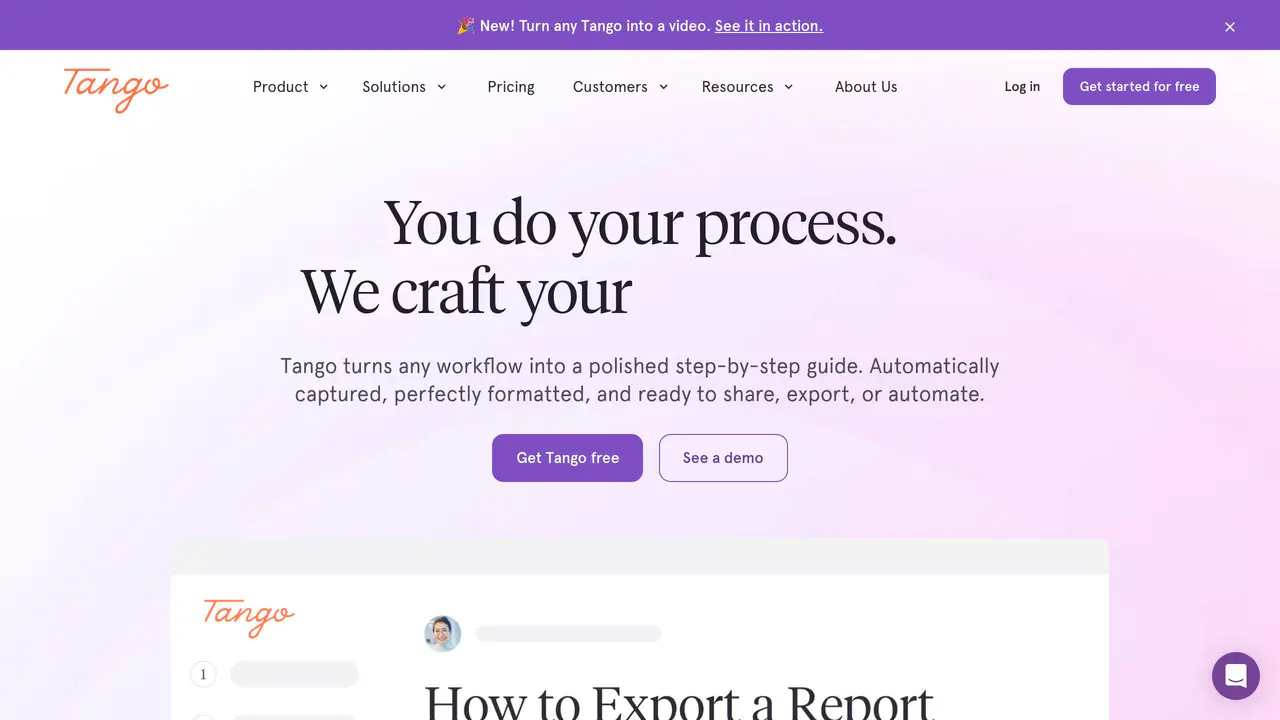
Read-only public captures of Tango’s homepage and verified pricing page. Screenshots are dated, never live embeds, and open full-screen.
1 earlier capture
In one minute
Start here for the decision-making essentials: what Tango does, who it is for, how it is accessed, and the first-party sources behind this profile.
Pricing4 options
Free tier available
Free Trial at $0 with 5 shared Workflows, browser capture, link and embed sharing, up to 1
Pro Team plan: $15/month per user (annual) or $20/month per user (monthly) for 3 or more u
Personal plan: $22/month per user (annual) or $26/month per user (monthly) for 1-2 users
Platforms
Browser extensionBrowser + desktop capture supportedChrome or Edge browser extensionBrowser extension and desktop application
API accessNot public
Founded2020
AvailabilityWeb / remote
LicenseProprietary
Best suited to
Source-backed fit HR teams standardizing processes and onboarding employees Finance and accounting teams creating SOPs Insurance and healthcare teams rolling out software Financial services teams supporting customers with in-app guidance Organizations needing AI-ready documentation of workflows Human Resources
Decision support
6 sourced answersCommon questions and adoption checks
Short answers to the questions buyers and builders commonly ask about Tango. Each answer cites the shared ledger below, where every source is listed once.
01What does Tango say it can do?
Turns any workflow into a step-by-step guide · Converts any Tango into a video · Turns guides into automations that perform repetitive clicking, navigating, typing, and fo · Turns processes into Documentation, In-App Guidance, Real-Time Automation, and SOPs
Turn any workflow into a step-by-step guide in minutes.
02Who is Tango intended for?
Human Resources · Financial Services · Human Resources, Finance and Accounting, Insurance, Healthcare, Financial Services · Targeted at Human Resources, Finance and Accounting, Insurance, Healthcare, and Financial
Human Resources
03What use cases does Tango describe?
Standardize Processes · Onboard Employees · Rollout Software · Support Customers
Standardize Processes
04What pricing information is available for Tango?
Free tier available · Free Trial at $0 with 5 shared Workflows, browser capture, link and embed sharing, up to 1 · Pro Team plan: $15/month per user (annual) or $20/month per user (monthly) for 3 or more u · Personal plan: $22/month per user (annual) or $26/month per user (monthly) for 1-2 users
Get started for free
05What integrations does Tango document?
Knowledge base, learning management, ticketing, and chat systems · Tango for NetSuite; Tango for Salesforce · Tango integrates with Claude Cowork to run SOPs · Works with all web-based applications without bespoke integrations (no API or MCP connecti
Embed your guides into your knowledge base, learning management, ticketing, and chat systems.
06How can Tango be deployed or accessed?
Cloud SaaS used to roll out enterprise software (e.g., Workday rollout to 1,400 employees · Deployed at enterprise scale, e.g., SEARHC rolled out Workday to 1,400 employees using Tan · Fully remote; employees can work from anywhere in the U.S.
How SEARHC Rolled Out Workday To 1,400 Employees
Decision guide
Workflow toolsCapabilities and operating fit
This profile connects the jobs Tango is described as handling with its delivery model, access options and the subjects used to match it to related products in this directory.
Common use cases
- Standardize processes
- Onboard employees
- Roll out software
- Support customers
- Create AI-ready documentation
- State of change enablement
Topics mapped
Verified capabilities
- Turns any workflow into a step-by-step guide
- Converts any Tango into a video
- Turns guides into automations that perform repetitive clicking, navigating, typing, and fo
- Turns processes into Documentation, In-App Guidance, Real-Time Automation, and SOPs
- Export to PDF, Markdown, and HTML; includes voice transcription, video embeds, branded wor
- Turn processes into Documentation, In-App Guidance, Real-Time Automation, and SOPs
- Document while you work
- Streamline process adoption via in-app guidance with step-by-step walkthroughs and callout
Recorded integrations
Knowledge base, learning management, ticketing, and chat systemsTango for NetSuite; Tango for SalesforceTango integrates with Claude Cowork to run SOPsWorks with all web-based applications without bespoke integrations (no API or MCP connectiBuilt to handle HubSpot and Salesforce front-end user interfaces, including CRM categoriesNetSuiteSalesforceNetSuite and Salesforce (offered as Tango for NetSuite and Tango for Salesforce)Positioned as a Scribe alternative and referenced for digital adoption/documentation workfIntegrates with Claude Cowork to run SOPs without manual effort
Intended audiences
Human ResourcesFinancial ServicesHuman Resources, Finance and Accounting, Insurance, Healthcare, Financial ServicesTargeted at Human Resources, Finance and Accounting, Insurance, Healthcare, and Financial Human Resources, Finance and Accounting, Insurance, Healthcare, and Financial Services funOrganizations including Netflix, IBM, Salesforce, NikeHuman Resources, Finance and Accounting, Insurance, Healthcare, and Financial Services teaHuman Resources, Finance and Accounting, Insurance, Healthcare, Financial Services teams
Access signals
- Pricing model
- Free tier available · Free Trial at $0 with 5 shared Workflows, browser capture, link and embed sharing, up to 1 · Pro Team plan: $15/month per user (annual) or $20/month per user (monthly) for 3 or more u · Personal plan: $22/month per user (annual) or $26/month per user (monthly) for 1-2 users
- API
- Not publicly listed
- Source links
- 17 recorded
Source-backed
Updated July 24, 2026Verified facts
Each fact points to a recorded source, making it easy to distinguish verified product information from claims that need checking.
Interactive User Guides Creation Software | Tango
Turns any workflow into a step-by-step guide in minutes · Converts any Tango into a video · Turns guides into automations that perform repetitive clicking, navigating, typing, and fo
Turns any workflow into a step-by-step guide
Converts any Tango into a video
Turns guides into automations that perform repetitive clicking, navigating, typing, and form-fill
Standardize Processes
Onboard Employees
View 32 more verified facts
Rollout Software
Support Customers
Human Resources
Financial Services
Free tier available
Browser extension
Knowledge base, learning management, ticketing, and chat systems
Turns processes into Documentation, In-App Guidance, Real-Time Automation, and SOPs
Standardize Processes, Onboard Employees, Rollout Software, Support Customers, AI-Ready Documentation
Human Resources, Finance and Accounting, Insurance, Healthcare, Financial Services
Free Trial at $0 with 5 shared Workflows, browser capture, link and embed sharing, up to 10 users per Workspace
Pro Team plan: $15/month per user (annual) or $20/month per user (monthly) for 3 or more users
Personal plan: $22/month per user (annual) or $26/month per user (monthly) for 1-2 users
Browser + desktop capture supported
Export to PDF, Markdown, and HTML; includes voice transcription, video embeds, branded workflows, screenshot annotation and blurring
Enterprise tier includes team onboarding and training
Turn processes into Documentation, In-App Guidance, Real-Time Automation, and SOPs
Standardize Processes, Onboard Employees, Rollout Software, Support Customers, AI-Ready Documentation
Human Resources, Finance and Accounting, Insurance, Healthcare, Financial Services
Training and Enablement platform / Digital Adoption & Documentation tool
Tango for NetSuite; Tango for Salesforce
Tango integrates with Claude Cowork to run SOPs
Documentation Creator, SOP Creator, Tutorial Creator, Employee Handbook Creator, Tango Nuggets, Tango Agents
Document while you work
State of Change Enablement
Cloud SaaS used to roll out enterprise software (e.g., Workday rollout to 1,400 employees at SEARHC)
Dedicated Security & Privacy resource category listed
Streamline process adoption via in-app guidance with step-by-step walkthroughs and callouts.
Delivers in-app guidance through a browser extension so users get step-by-step help inside any tool without switching tabs.
Highlights UI elements via an 'orange box' that shows users where to click to follow processes across applications.
Provides contextual callouts and pro tips in the flow so users can complete processes like experienced experts.
Measures adoption and enables continuous improvement through an Analytics product.
Practical capabilities
8 documented areasWhat it helps with
A concise view of the jobs, capabilities and integrations described in the recorded product sources.
Standardize processes
Onboard employees
Roll out software
customers
Create AI-ready documentation
State of change enablement
Convert guides into automations for repetitive clicking, navigating, typing, and form-fill
Rollout Software
Availability
Source checkedWhere it runs and where to get it
Documented product formats, platforms and official distribution destinations. Availability can vary by region and plan.
Cost / license
Free tier available · Free Trial at $0 with 5 shared Workflows, browser capture, link and embed sharing, up to 1 · Pro Team plan: $15/month per user (annual) or $20/month per user (monthly) for 3 or more u · Personal plan: $22/month per user (annual) or $26/month per user (monthly) for 1-2 users
Application types
Training and Enablement platform / Digital Adoption & Documentation toolDocumentation, In-App Guidance, Real-Time Automation, SOPsPositioned as an alternative to Scribe for process documentation and digital adoption
Origin
Remote startup
Platforms
Browser extensionBrowser + desktop capture supportedDocumentation Creator, SOP Creator, Tutorial Creator, Employee Handbook Creator, Tango NugRuns as a browser extension that overlays guidance on any web-based application.Web (tango.ai) and SoftwareChrome or Edge browser extensionBrowser extension and desktop applicationFree browser extension available for installationFree browser extension installable for websites and browser apps
App stores and other links
Adoption notes
DeploymentCloud SaaS used to roll out enterprise software (e.g., Workday rollout to 1,400 employees · Deployed at enterprise scale, e.g., SEARHC rolled out Workday to 1,400 employees using Tan · Fully remote; employees can work from anywhere in the U.S.
LicenseNot disclosed by source
Model supportNot disclosed by source
Data controlDedicated Security & Privacy resource category listed · Operates using existing employee privileges with no admin access required · Dedicated Security & Privacy resource page · Has a Security & Privacy resource page
Learning curveIntermediate
Primary use casesStandardize processes, Onboard employees, Roll out software, Support customers, Create AI-ready documentation, State of change enablement, Convert guides into automations for repetitive clicking, navigating, typing, and form-fill, Standardize Processes, Onboard Employees, Rollout Software, Support Customers, Standardize Processes, Onboard Employees, Rollout Software, Support Customers, AI-Ready Do, State of Change Enablement, Turning processes into documentation, in-app guidance, real-time automation, and SOPs., Standardizing processes, onboarding employees, rolling out software, supporting customers,, Standardize Processes, Onboard Employees, Rollout Software, Support Customers, and AI-Read
What to verify before adopting
Evolution and major updates
Research in progressTango timeline
A concise history of software releases and material product changes. Events appear only when a dated source supports what changed.
Scheduled for research
Building a reliable release history.
This profile is being checked for dated releases and material product changes. Nothing appears here until the exact date and event can be verified from a recorded source.
Dated event Short explanation Original source
Citation ledger
17 unique pagesRecorded sources
Facts, answers, structured details, milestones and primary resource links cite this shared ledger. Each external page appears once; release tags from the same GitHub project are grouped under one release history.
- 1tango.ai 16 facts · 5 answers · Official site
- 2tango.ai/product/guide 12 facts · 5 answers · Official site
- 3tango.ai/category/documentation 11 facts · 5 answers · Documentation
- 4tango.ai/integrations 12 facts · 1 answer · Official site
- 5tango.ai/pricing 9 facts · 4 answers · Pricing
- 6tango.ai/about-us 11 facts · 1 answer · Official site
- 7tango.ai/press-kit 11 facts · 1 answer · Official site
- 8tango.ai/privacy 10 facts · Security
- 9tango.ai/customers 8 facts · 1 answer · Official site
- 10tango.ai/features 4 facts · Official site
- 11tango.ai/blog Official site
- 12tango.ai/blog/documentation-tools Documentation
- 13tango.ai/blog/process-documentation Documentation
- 14tango.ai/blog/saas-documentation Documentation
- 15tango.ai/product/it-documentation Documentation
- 16tango.ai/real-time-automation/pricing Pricing
- 17tango.ai/video/tango-free-vs-pro-vs-enterprise-which-plan-is-right-for-you Official site
Research status120 substantive facts · 17 source pages · quality score 95/100
Connected directory
Semantic matchesExplore related solutions
These tools share a workflow, capability or audience with Tango. They may complement it rather than replace it, and are not presented as integrations or endorsements.